FlipCon Gold Coast 2016: Top 5 takeaways

So last week I attended FlipCon Gold Coast for a 3 day conference. This is the second time that I have attended this event and it didn’t disappoint. Not only were the keynotes fantastic and inspiring, the networking was amazing. Check out Clickview for recordings of all the keynotes from the conference.

Read about my top 5 takeaways from FlipCon in 2017

This year I decided not to present at the conference and just attend and experience all the sessions, as I honestly felt I missed out in 2016. However on reflecting on my experiences this year I think I will definitely apply to present next year as I have some great ideas for workshops that I think delegates would both enjoy and walk away from with something useful.

So in this weeks post is about the Top 5 things that I took away from this years conference.

My Top 5 List

1. “Flipping is about the videos” (Quote: Aaron Sams, FlipCon GC 2016)

2. Forming partnerships is essential to flipped success

3. “You need a balance of practice and ‘fun stuff’.” (Jon Bergmann, FlipCon GC 2016)

4. Flexibility in students learning the content is essential

5. Scaling of flipped learning will happen by good flipped teaching

My Top 5: Expanded and Explained

Continue reading

Posted in Flipped Teaching | Tagged , , , , , , | Leave a comment

Professional Development Through Twitter

I am endlessly looking for satisfying professional development as a teacher and leader. But what does good professional development usually look like? To me the best type is the PD where I get to network with colleagues from many different backgrounds. How often do we get to attend PD’s such as these? Once maybe twice a year?

What if you could get this type of PD as many times a week as you liked, right in the comfort of your own home? You could choose how much you interacted? Sounds too good to be true right?

30551b23ea1e0a3dd1e0106bba4086fd

I have recently found twitter chat. It is the most fabulous PD for teachers.  twitter

Continue reading

Posted in Leadership, Technology | Tagged , , , | 1 Comment

How flipping gained my class time

Ever felt that you don’t have enough time to do what you need to? That the curriculum is so cluttered there is no time to master anything during class time? As teachers this seems to be a common dilemma for all of us.

Regain your time in the classroom by flipping.

</a>”http://www.freepik.com/free-vector/vintage-clocks-pattern_857152.htm”>Designed by Freepik</a>


When I first started investigating flipped teaching a couple of years ago I was looking for a strategy that could gain me back time. I wanted to run a program in my year 8 science class where the curriculum could be condensed into 8 weeks instead of 10 and the students got to do more activities during that 8 weeks. The extra 2 weeks was to be used for a collaborative project that would run for the year giving students 6 weeks in total to work on it. Continue reading

Posted in Flipped Teaching | 3 Comments

Have you Flipped Your Classroom?

Have you flipped your classroom yet?

By the end of this post I guarantee that you will be asking yourself why you haven’t yet.

start-with-why.jpg

What is a flipped classroom? 

A flipped classroom takes many forms however essentially it is the reverse of traditional teaching methodology in that students work through the content at home and then practice during class where the teacher is available to help them.

The way students engage with the content varies from teacher curated videos to commercial videos, podcasts, powerpoints and a range of other interactive platforms.

Many of us have engaged in flipped teaching at one stage during our careers, even asking students to read a section of text or review a powerpoint at home before attending class is an example of flipped teaching.

youtube

The reason that flipped teaching is gaining such momentum at the moment though is that content is getting easier to find or make. Technology is getting easier to access for teachers and students.

With the role out of NBN the ability of students to download and stream videos at home is increasing in ease.

What are the benefits of flipping?

Continue reading

Posted in Flipped Teaching | 1 Comment

The 4 Big Mistakes I Made Flipping

I have been working in a flipped classroom environment for a number of years but in the last year I have trialled a number of different approaches to the flipped model.

Jon Bergmann and Aaron Sams are credited with the innovation of Flipped learning in America. Check out Jon here.

The 4 big mistakes I made flipping and how I'm fixing them.

My current trial was in a year 9 laptop maths class and here are my top 4 mistakes:

  1. I didn’t make enough videos at the beginning.
  2. I gave students too much choice about what to be working on in class
  3. I waited too long to check on student progress in their workbooks.
  4. I didn’t contact all parents as I intended to.

So in retrospect if I had changed these 4 things I would have had a much smoother implementation. I am sure that there are many other things that I could have also changed but these are the ones that I think would have had the biggest impact. Continue reading

Posted in Flipped Teaching | Tagged , , , | Leave a comment

Contact

Thanks for visiting Educating the Digital Learner

You can use this form to get in touch with us and we will get back to you with a response. Otherwise your can visit our Facebook page

← Back

Thank you for your response. ✨

Posted in Uncategorized | Leave a comment

Planning for BYOD in 2017

A few posts ago I talked about ensuring that I plan better for 2017 to hopefully ensure that I complete the tasks that I want to. One of the major changes at my school is the beginning of BYOD (Bring Your Own Device) for all students.

Planning for this change is exceptionally important as it is the planning that ensures its success.

keep-calm-byo

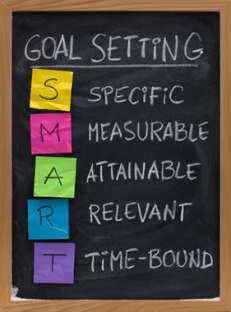
To plan for this change I am going to use the smart goal planner that I eluded to in Leading Change in 2017 and also use the successful change model by Knoster to guide the goals that I select to focus on for the next 6 month. After 6 months I will re-evaluate and adjust my planning for the remainder of 2017.

As I mentioned above to form my SMART goals I am going to use a template provided by Tina Doe  for planning effective SMART goals. Tina is an Education Consultant and has given me permission to share her template. (staff-smart-goal-template planner by Tina Doe at tinadoe.com)

smartgoals

The following points will form the actions and comments that I will make in my SMART goal planner. (Based on Knoster’s change model) Continue reading

Posted in planning, Technology | Tagged , , , , | 1 Comment

Find Your Flipped Learning Workflow

Another perspective on how to decide what to put in your digital toolbox. Workflow is important in determining the devices and software that are really important to you. Thanks to Joel Speranza.

edtechenthusiast's avatarEd Tech Enthusiast

“Flipped Learning is NOT about making videos…” I hear this so often when flipped learning gets discussed. I myself even gave a talk at Flipcon last year with this exact title.

But the truth is, it kind of IS about the videos.

I understand the sentiment. Everyone who flips knows that the real benefit to flipped learning is what happens in your classroom. It’s the extra time you have for collaboration, for 1:1 chats with students, for feedback. It’s the face to face time that really matters!

But what you can’t get around is that when it comes to flipped learning, the new part, the hard part, is making the videos.

The video making bit is the barrier to entry. There are just so many unknowns around it.

  • How do I make the video?
  • Won’t I look stupid on camera?
  • What software do I use?
  • Do I need a video…

View original post 878 more words

Posted in Flipped Teaching, Technology | Leave a comment

Why I Love My IPAD

Yes I love my IPAD. In fact I don’t think that I could function efficiently in the classroom if I didn’t have it with me.

I was first introduced to the joys of an IPAD in the classroom for efficient management a few years ago when I was given one to help with part of my management role. I have since left that school and as soon as I knew I wouldn’t be given one at my new school I just had to buy one.

I don’t have anything fancy, just an IPAD Air Wifi.

So why do I love my IPAD?

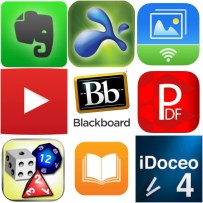
I can use it to control my computer from anywhere in the classroom. I’m sure that there are a few apps out there that let you do this but I use an app called Splashtop  which allows me to do this through the wifi at school. There are so many benefits to being able to freely move around the classroom away from my computer.

I keep all my roles, markbooks, homework checks etc in an app called IDOCEO, this is a paid app but it is well worth the money. As well as being an easy use platform for recording all my everyday classroom information it also has the ability to export data and run analytical reports on the data entered. Well worth an investment.

These two apps alone make my IPAD worth its weight in gold. However I do have a number of other useful apps that have made my teaching life easier.

  • Evernote (great for conferences and sharing ideas across a range of platforms)
  • PDF connect (great scanning function to email documents or record student work)
  • Die Roller
  • ibooks (great for storing textbooks and other documents)
  • Transfer (easy transfer of photos and video to computer via wifi)
  • And a few others.

 What apps do you love? Apps
 

Posted in Technology | Tagged , , , , | 2 Comments

The Digital Toolbox

So what is a Digital Toolbox?

I heard this term last year for the first time at FlipCon, during a session with Joel Speranza. Joel described the digital toolbox as the tools that you use to prepare and run your digital classroom.

Every toolbox must have:

  • A presentation surface
  • A recording device
  • Screen Capture software
  • A video sharing platform
  • A LMS (Learning Management System

Plus you might also want:

  •  Interactive software / interface
  • Analytics
  • Document Camera
  • Other devices
  • Apps
  • Online Programs

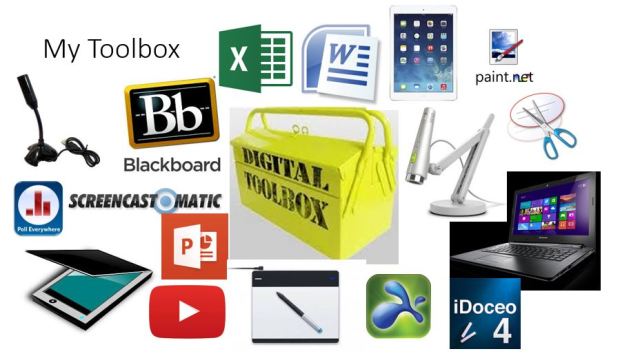
My Digital Toolbox

As you can see from my toolbox above, your toolbox doesn’t have to be huge or expensive. The key is to make use of what you already have access to and are comfortable with. If you try to add too many different items at a time you will feel totally overwhelmed. Continue reading

Posted in Flipped Teaching, Technology | Tagged , , , , , | 4 Comments