Teach Tip Tuesday: Encourage Growth Mindset now!

With the first week down and the second just begun in Queensland now is the time that we reflect on what values we want to instil in our students.

One of the best values that you could invest time and energy into is Growth Mindset.

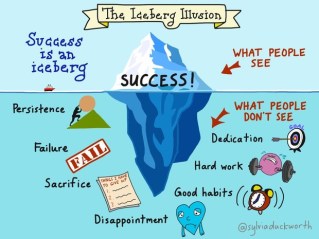
Originally developed by Dr. Carol S Dweck an American physcologist in 2007, the concept of growth mindset has become the new it thing. Iceberg illusion.jpeg

Why is it so great?

Developing Growth mindset in students develops the idea for students that it is ok to fail and that through failure we learn and improve.

Too often in our digital age students expect instant gratification. They want the answer right then and if they can’t find it they give up.

Resilience or the ability for students to bounce back after failure is one of the key qualities that our students will need to secure the jobs of the future. Jobs that require innovation and creativity. Jobs that they will more than likely define.

Read more about Growth Mindset here.

My 5 Tips to introduce Growth Mindset in your classroom

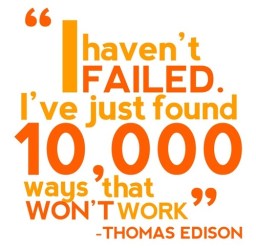
1. Introduce the idea that failure is ok. That lots of people fail. In fact if you haven’t failed your lying. 🙂

thomas-edison-quotes-sayings-success-failed.jpg Continue reading

Posted in Flipped Teaching, General Teaching, Teach Tip Tuesday | Leave a comment

How to organise your data to help your planning.

At the half way point of the first week of school teachers are busy analysing whatever data sets they can get their hands on so that they go into the classroom armed with the knowledge of how best to teach their students.

With the overwhelming supplies of data and numerous reports that you can get we are overloaded with so much of it sometimes it seems impossible to work out which piece to use. Should I draw conclusions from NAPLAN, last years results, behaviour, effort, PAT test, ICAS test and on and on it goes.

Here’s 5 easy steps to integrate and draw conclusions from your set of data.

1. Look at your NAPLAN and previous year results to determine the spread of students in your class. (This is simply to determine how broad your differentiation may be.)

naplan

2. Identify students that are trending upwards by 2 or more bands in NAPLAN and one achievement standard in their previous results. Also look for students trending down in NAPLAN and achievement.

trends2012.jpg Continue reading

Posted in General Teaching | Tagged , , , | Leave a comment

Teach Tip Tuesday: Make Contact with Students Parents.

If you are a Queensland teacher by now you will be in the full swing of teacher mode.

In the first two weeks it is really important to make contact with all of your parents or carers. I am not suggesting that you sit down with them and have a chat or call every single one but some sort of contact would be nice.

Teach Tip Tuesday: Make contact with parents within 2 weeks to setup a productive year.

How you go about contacting parents really depends on what year level you are teaching and just how many parents you need to contact.

Contacting home early has at least two benefits. Firstly your first contact will be a positive one and for some parents this is a nice change from the previous year. Secondly it gives you an opportunity to outline your expectations of their children and your style of teaching.

Here are 5 ways to contact parents that don’t take much time.

1. Hold  a come and meet the teacher morning, afternoon or evening.Teach Tip Tuesday: Make contact with parents within 2 weeks to setup a productive year.

  • Probably more suited to primary classes where there is generally only one teacher.

2. Send home a letter introducing yourself and outlining your expectations.

3. Send a text message to parents.

  • This can be really quick if you have a sms system already in use in your school.
  • Short and sweet, to the point means parents don’t have to spend heaps of time on your message.

4. Send an introductory email. 

  • Set up a class contact list in your email so that you can send out email communication throughout the year. (Don’t forget to use BCC!!!)
  • This also opens email up as a avenue for communication which can save you many hours of phone calls throughout the year.
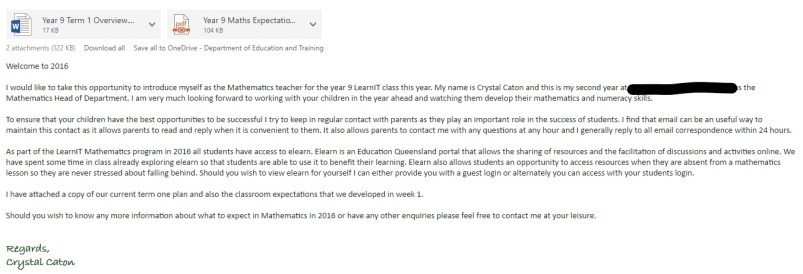
  • Below is an example of the email that I sent last year.

Teach Tip Tuesday: Make contact with parents within 2 weeks to setup a productive year.

5. Send an introductory video. Click here to see an example.

  • A video makes it feel like they are really meeting you.
  • It also shows off your tech skills 🙂


Wishing all my colleagues a positive start to the new school year. If you have other suggestions for contacting parents in the first 2 weeks please comment below or leave a post on our facebook page.

Posted in General Teaching, Teach Tip Tuesday | Tagged , , , | 1 Comment

How to Plan for a Flipped Classroom

This weeks post looks at how to do your planning for a flipped classroom.

Last year I did my planning in two different ways and one of these was clearly the winner.

You might be asking how planning for a flipped classroom is any different to planning for a regular classroom. Not flipping yet and would like to know more click here.

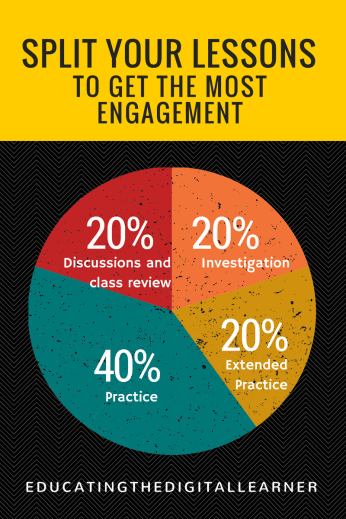
If you consider that on average at least 50% of your class time is spent on giving students direct instruction where they sit and listen to you tell them what to do and how to do it and flipping your classroom reduces this direct instruction time to less than 10% of your lesson what do you do with that extra 40%.

Change how you plan to be a better flipped teacher.

In my classroom there isn’t really any direct instruction but the beginning of the lesson is a conversation about what we learnt in preparation for that lesson, this takes maybe 10 minutes. My lessons are 70 minutes long. Previously I would have spent about 30-40 minutes teaching a new concept, so what do I do with that extra time? An extra hour and 2o minutes a week?

Continue reading

Posted in Flipped Teaching, planning | Tagged , , , , , , | Leave a comment

Teach Tip Tuesday: Digital Organisation

Over the last couple of years I have started to move to organising the majority of my important documents digitally.

Teach Tip Tuesday: Digital Organisation. Go paperless by using apps to organise your rolls, checklists, calendar etc.

These include rolls, assessment planners, calendars, diary entries and …

Having left the paper versions behind I feel liberated. No more needing a new book grade book when the room runs out or writing individual student names in for each class. Searching on my desk for that lost roll and the continual filing of more and more paper. I swear it multiplies exponentially.

Here are the top 3 things that I now do digitally and the programs that I use to do it.

1. All classes, meetings etc scheduled in Outlook and colour coded.outlook

  • Having all these daily tasks in one platform lets me plan my week and each day at a glance. Outlook also reminds me when tasks are nearly due so that I don’t miss a deadline. Since all my classes and meetings are scheduled in Outlook all my staff are able to see my availability and if I have shared my calendar with them they can also see where I am. Outlook also allows me to link with the school calendar so that I can see all events that are going on within my school on the one page.
  • Use the calendar program that your school is using so that you can view both calendars together.
  • Having all of this in one spot also helps me to track my productivity for the day.

Continue reading

Posted in Organisation, Teach Tip Tuesday | Tagged , , , | 1 Comment

5 Steps to Setting Professional Goals for 2017

For most Queensland teachers we head back to work in less than a week. Say goodbye to late sleep ins and carefree days…. sigh…

When we return to work we need to consider what our goals are as teachers for the next 12 months. Maybe just like new years resolutions we won’t stick to them but it’s still worth the reflection and at least a few weeks of trying to make them happen.

One of the biggest mistakes that people make when they set goals is they are unrealistic or they don’t make a plan for how they expect to achieve them.

According to StatisticBrain.com less than half the people that make new years resolutions see them past 6 months. Of these people that are still on track only approx 8% of you that originally made resolutions actually achieved them.

I suppose the question is then why bother, why not keep on doing exactly what we’ve been doing before? I suppose that I could just continue to do what I did last year in exactly the same way, but I risk becoming stale, I risk burning out from making the same mistakes, I risk not being the best teacher for my students that I can be and the best manager for my staff.

Make a start to the school year by planning your goals for the year before your start helping students plan for theirs.

Continue reading

Posted in General Teaching, planning | Tagged , , , , , , | 1 Comment

Teach Tip Tuesday: 7 Steps to Creating a productive working environment

Welcome to the first Teach Tip Tuesday.

Teach Tip Tuesday @ educatingthedigitallearner.com

With 2 weeks to go until students arrive back at school in Queensland from their long Christmas break, the first part of my organisation for going back to school is to make sure that I have a work space that I can be productive in.

Whether it’s your home office or school desk, the best way to begin the school year is with a tidy and organised space free of clutter.

Now is the time to get your desks and offices in order in 7 easy steps.

Organise your workspace for a great start to the new school year.

1. Clear out all old documents that you don’t need to keep. 

Organise your workspace for a great start to the new school year.

  • Don’t forget to recycle all of that paper.
  • Ensure you store your diary, attendance records and mark books. (Or go digital… post to come)

2. Cull resources that you haven’t used in the past 4 years. Ask the following questions if you aren’t sure whether to keep or toss:

Continue reading

Posted in General Teaching, Organisation, Teach Tip Tuesday | Tagged | Leave a comment

Welcome to 2017

Welcome to 2017 banner Follow educatingthedigitallearner.com for classroom ideas in 2017

I hope your Christmas break has been as relaxing as mine in the company of your friends and family.

Follow educatingthedigitallearner.com for great educating ideas in 2017.

This year I will be aiming to release 2 posts per week: Teach Tip Tuesday and General blog posts on Thursdays.

Teach Tip Tuesday: A short post with a tip to help you organise and streamline your time at school to help with your work life balance.

Teach Tip Tuesday @ educatingthedigitallearner.com

General Posts: will continue to cover a range of topics including general teaching, technology, organisation, management etc.

Don’t forget if you are looking for posts on a particular topic you can search for them on the home page or in categories.

Looking forward to a productive and less stressful 2017. Happy to have you all along with me.

Comment below or on our facebook page if there is something you would like to hear about in 2017.


Posted in About Me | Leave a comment

Easy Marking in a digital environment

Firstly I would like to apologise for my silence over the last month, but as you all know this is one of the busiest times of the year for an Australian teacher. But now that the seniors are finished I can turn my mind back to sharing my thoughts and experiences with other like minded teachers and also planning for 2017.

Recently I have been talking with some of my colleagues and there seems to be a fear out there when it comes to collecting assessment digitally. This fear seems to stem from one of two reasons: not being able to mark it how it is received (“it will take too long”) or that the assessment will be lost.

Go digital to streamline your marking and save time.

These two sentiments are out weighed by the benefits of working in a digital way with submissions. Whether it be for drafts or for final submissions.

Benefits:

  1. Work can be checked for plagiarism.
  2. You already have a submission for those that fail to submit a final.
  3. Feedback can be provided to the student as you mark it.
  4. You are not bound by the amount of room on the submission.
  5. Students don’t have to understand your scrawl.
  6. You can provide more specific feedback.
  7. Students can interact with you.
  8. If a student doesn’t change anything you have already marked their assessment.
  9. ….. And they continue

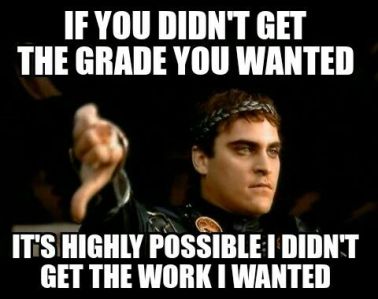
Meme: If you didn't get the grade you wanted it's highly possible I didn't get the work I wanted. Go digital to streamline your marking and save time.

So there is a short list of the benefits of marking digitally. But to alliviate one of those fears that I was talking about before the not knowing how, there are two easy ways that I use to provide digital feedback.

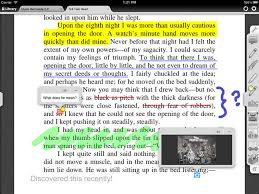
Example of digital marking in text. Go digital to streamline your marking and save time.

Options for feedback:

  1. Use the comment and review function in word.
  2. Use the comment, insert text, insert audio function in Adobe PDF reader.

There are also a number of other options for returning digital feedback like video and straight audio however the two above are the ones that I am most comfortable with at the moment.  Continue reading

Posted in Flipped Teaching, Technology | Tagged , , , | 1 Comment

How Pinterest helped me in the classroom

Have you ever tried to search for a particular worksheet, education article, poster etc? I know I have and even with the invent of Google and its amazing search engine I still find myself mindlessly scanning through hundreds of search pages.

Meme: You mean to tell me there are people who don't know what pinterest is? Use pinterest as a tool to find resources and ideas from blogs that you wouldn't find with a regular google search.

This is where Pinterest comes into its own. Pinterest is a picture based search engine that draws from a community that adds images and tags them under particular categories. Because the images that Pinterest uses come from their community there is a wide variation of images compared to those that you would find using a google search engine.

Pinterest also allows you to categorise your finds on boards so that you can find them easily when you want them. It also allows you to follow other people and their boards. Since its visual and the text is limited you can navigate your way through so many more images then you could scan text in the traditional search form.

If you are looking for worksheets simply type in the topic and you will find a heap at your disposal. Looking for classroom organisation ideas and you will be linked to hundreds of blogs from around the world with fantastic ideas that you would never come across in a traditional search engine.

Meme: One does not simply check pinterest real quick. Use pinterest as a tool to find resources and ideas from blogs that you wouldn't find with a regular google search.

Recently I was looking for algebra worksheets for my flipped class to use in our group rotation sessions. I wanted something that was beyond the standard answer a tonne of questions and check your answer. So type in what I want into the search bar and I found over 100 links to different worksheets, some paid and some free with a variety of different types of activities. My favourite type were the colouring ones and my class loved these, not only were they fun with a pretty picture revealing itself at the end they also allowed the students to check their answers as they went along. Below is an example of one of the resources that I found.
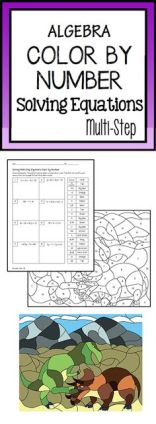
colour-by-number-algebra

I don’t know about you but anything that saves me time searching or creating the perfect resources is something to look into.

Pinterest has also been an excellent resource in gaining ideas for the implementation of my flipped classroom. Flipping isn’t just about the videos that the students watch it is also about the activities that you plan to do when they aren’t watching the videos. Pinterest is a great source of ideas for the types of activities that you can do to engage learners and check for understanding.

Also a great place to find poster for classroom decoration, templates and scaffolds.

If you haven’t tried Pinterest yet for education I highly suggest that you give it go. You can follow my board here : www.pinterest.com/me8ee.

pinterest-logo

Found a great pinterest board? Want to know how to search or use pinterest? Comment below or contact me using the contact form or at our facebook page.



Posted in Technology | Tagged , , , , , , | Leave a comment